
Track: How Computers Work · Lesson 3 of 10 · Ages: 8+ · Time: 35 minutes
Computers only understand numbers, and in the last lesson we saw that they write those numbers using bulbs that are on or off. So how can a computer store the word “HELLO” or this very sentence? The answer is a simple trick: give every letter its own number.
Beep says When you type the letter A, I do not see an A. I see the number 65. It is like a secret code that everybody agrees on. Beep boop!
What you need
- Paper and a pencil.
- A friend or grown-up to swap secret messages with.
- About 35 minutes.
Every letter gets a number
Long ago, people made a list that gives every letter, digit and punctuation mark a number. That list is called ASCII (say “ask-ee”). Computers all over the world follow it, so a message typed on one computer can be read on another.
Capital letters start at 65:
- A is 65, B is 66, C is 67, and so on.
- Counting along, Z is 90.
Here are a few more, so you can see how it works:
| Character | Number |
|---|---|
| A | 65 |
| E | 69 |
| H | 72 |
| Z | 90 |
| a (small letter) | 97 |
| 0 (the digit) | 48 |
| Space | 32 |
Even a space has a number, because the computer needs to remember where the gaps in a sentence are.
Pixel says Small letters have different numbers from capitals. A is 65 but a is 97. That is a difference of exactly 32, which is a neat pattern for a cat who loves patterns. Meow!
From letters to bulbs
Now we put the two lessons together. The letter H is number 72. In eight bulbs, 72 is 64 + 8:

And the letter A is number 65, which is 64 + 1:
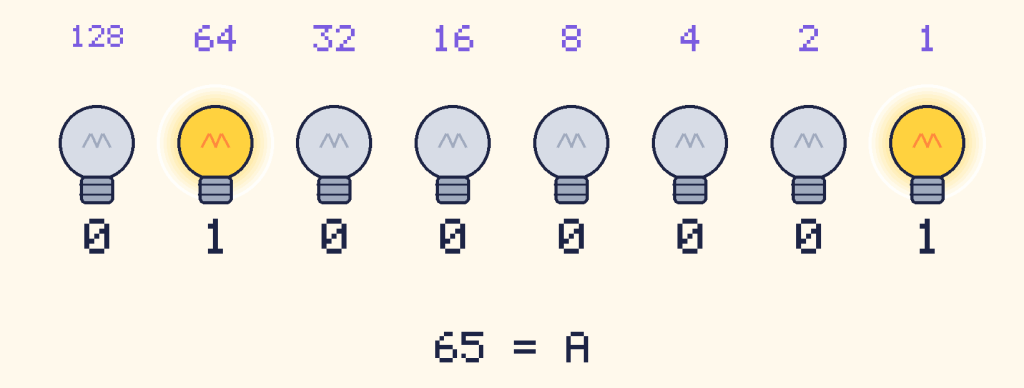
Each letter fits in a group of eight bulbs, or eight bits. A group of eight bits is called a byte. So one letter takes one byte. The word HELLO is five bytes: five groups of eight bulbs.
Let Python do the work
The Python function ord() finds the number for a character. The function chr() goes the other way, from a number back to a character.
for letter in "CAT":
    code = ord(letter)
    print(letter, code, format(code, "08b"))
print(chr(72) + chr(73))
print(ord("a") - ord("A"))
C 67 01000011 A 65 01000001 T 84 01010100 HI 32
The first three lines show each letter, its number and its bulb pattern. The line with chr(72) + chr(73) turns 72 and 73 back into H and I. The last line checks Pixel’s pattern: small a minus capital A is 32.
Now let us decode a whole message from a list of numbers:
codes = [72, 69, 76, 76, 79]
message = ""
for code in codes:
    message = message + chr(code)
print(message)
HELLO
Decode a secret message
Your friend sends you this message in bulb patterns. Each group of eight digits is one letter.
01000010 01000101 01000101 01010000
Here is how to decode the first group, 01000010. The bulbs that are on are worth 64 and 2, so the number is 66. Count up the alphabet from A = 65, and 66 is B.
Try it Decode the other three groups. What does the message say?
Show the answer
01000101 is 64 + 4 + 1 = 69, which is E. The last group, 01010000, is 64 + 16 = 80, which is P. The message says BEEP. Beep is saying hello!
Try it Now send a message back. Pick a short word, like PIXEL or FISH. Write down each letter’s number, then turn each number into eight bulbs. Swap with a friend and decode each other’s messages. Can Python check your answer?
Show a worked example
PIXEL is 80, 73, 88, 69, 76. As bulb patterns that is 01010000 01001001 01011000 01000101 01001100. To check with Python, use print(chr(80) + chr(73) + chr(88) + chr(69) + chr(76)).
More than English
ASCII was made for English, so it does not have letters like é or characters from other languages, and it has no emoji. Today almost every computer uses a bigger list called Unicode. It gives a number to the letters of many of the world’s languages and to emoji too. The first 128 numbers of Unicode are the same as ASCII, so A is still 65. Characters with bigger numbers need more than one byte.
Did you know? ASCII was first published in the 1960s. It only used 7 bulbs per character at the start, which gives 128 different characters. Computers later used a full byte of 8 bulbs per character.
Grown-ups This is a good chance to talk about codes agreed by everyone, which is why a text file from one computer can open on another. For extra practice, children can swap short secret messages in binary. Keep them light, like favourite animals or snacks, with no personal details.
What you learned
- Computers store letters as numbers, using an agreed list called ASCII. Capital A is 65.
- A byte is a group of eight bits, and one letter fits in one byte.
- Small letters and capital letters have different numbers.
- Unicode is a bigger list that includes many languages and emoji.
- In Python,
ord()turns a character into its number andchr()turns a number into a character.