
The hidden picture is a planet with a ring!
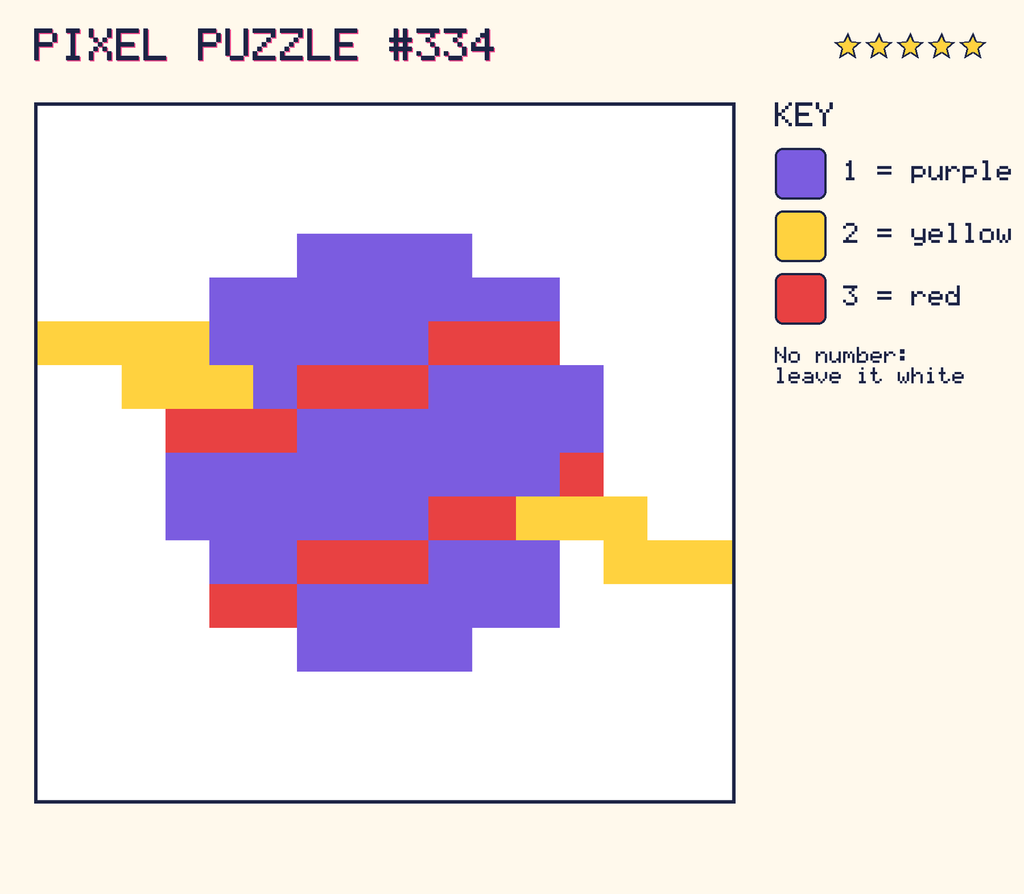
The picture as Python
Here is the same picture stored as numbers in a Python list. The program reads each number and prints a symbol for it, so you can see the picture appear in the Python shell.
picture = [
    "0000000000000000",
    "0000000000000000",
    "0000000000000000",
    "0000001111000000",
    "0000111111110000",
    "2222111113330000",
    "0022213331111000",
    "0003331111111000",
    "0001111111113000",
    "0001111113322200",
    "0000113331110222",
    "0000331111110000",
    "0000001111000000",
    "0000000000000000",
    "0000000000000000",
    "0000000000000000",
]
symbols = " #@*"

for row in picture:
    line = ""
    for number in row:
        line = line + symbols[int(number)]
    print(line)
When you run it, it prints:
      ####
    ########
@@@@#####***
  @@@#***####
   ***#######
   #########*
   ######**@@@
    ##***### @@@
    **######
      ####
Squashing the picture smaller
Computers often save space with a trick called run-length encoding. Instead of storing every pixel, they count how many of the same colour are in a row. Here’s this picture written that way:
Show the run-length code
- Row 1: 16 × white
- Row 2: 16 × white
- Row 3: 16 × white
- Row 4: 6 × white, 4 × purple, 6 × white
- Row 5: 4 × white, 8 × purple, 4 × white
- Row 6: 4 × yellow, 5 × purple, 3 × red, 4 × white
- Row 7: 2 × white, 3 × yellow, 1 × purple, 3 × red, 4 × purple, 3 × white
- Row 8: 3 × white, 3 × red, 7 × purple, 3 × white
- Row 9: 3 × white, 9 × purple, 1 × red, 3 × white
- Row 10: 3 × white, 6 × purple, 2 × red, 3 × yellow, 2 × white
- Row 11: 4 × white, 2 × purple, 3 × red, 3 × purple, 1 × white, 3 × yellow
- Row 12: 4 × white, 2 × red, 6 × purple, 4 × white
- Row 13: 6 × white, 4 × purple, 6 × white
- Row 14: 16 × white
- Row 15: 16 × white
- Row 16: 16 × white