
Track: How Computers Work · Lesson 5 of 10 · Ages: 8+ · Time: 35 minutes
A computer cannot keep a drawing in its memory the way you keep a drawing in a sketchbook. It has no paper and no pencils. All it can store is numbers. So how does a heart, a cat or a photo of a sunset get saved? Let us find out by turning a picture into numbers ourselves.
Beep says To a computer, every picture is a big list of numbers. When it wants to show the picture, it just reads the list. Beep boop!
What you need
- Squared paper (or a ruler to draw a grid) and a pencil.
- A friend or grown-up to share secret pictures with.
- About 35 minutes.
A picture is a grid of numbers
Here is a simple black-and-white picture, with only two choices for each pixel: it is either on (coloured in) or off (empty). On a computer, we write 1 for on and 0 for off. Do you remember those from the bulbs lesson?
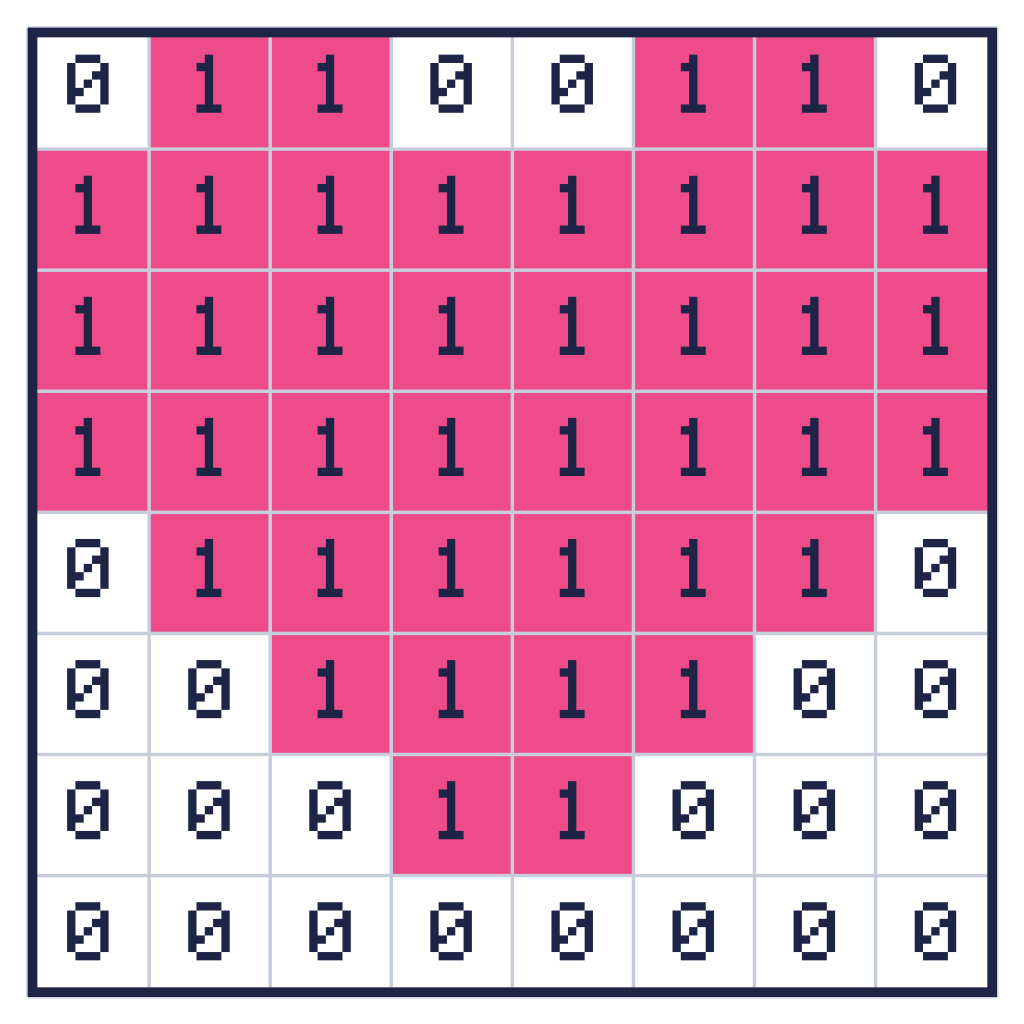
Each row of the picture is a row of eight 0s and 1s. That is exactly eight bits, so each row is one byte! The whole heart takes just eight bytes. Here they are, along with the number each row makes when read as bulbs:
rows = ["01100110", "11111111", "11111111", "11111111", "01111110", "00111100", "00011000", "00000000"]
for row in rows:
    print(row, int(row, 2))
01100110 102 11111111 255 11111111 255 11111111 255 01111110 126 00111100 60 00011000 24 00000000 0
The code int(row, 2) reads the text as a binary number. For example, 01100110 is 64 + 32 + 4 + 2, which is 102. So the whole heart can be saved as the list 102, 255, 255, 255, 126, 60, 24, 0. That is a picture, written down as numbers.
Pixel says A picture with more colours needs more bits for each pixel. A colour pixel needs three bytes, as you saw in the last lesson. Meow!
Pictures get big
A photo from a phone can have 12 million pixels. At three bytes for each pixel, that would be 36 million bytes for a single photo! That is a lot of storage and a lot to send to a friend. Computers use a trick called compression, which means storing the same picture in fewer bytes.
A simple trick: run-length encoding
Look at the row 11111111. Instead of writing eight 1s, we could say “eight 1s”. Much shorter! Writing down how many times something repeats is called run-length encoding. A group of the same symbol in a row is called a run.
Let us do this for the heart. We write how many 0s come first, then how many 1s, then how many 0s, and so on, taking turns. If a row starts with a 1, we begin with a 0, which means “zero 0s”.
| Row | Counts |
|---|---|
| 01100110 | 1, 2, 2, 2, 1 |
| 11111111 | 0, 8 |
| 01111110 | 1, 6, 1 |
| 00111100 | 2, 4, 2 |
| 00011000 | 3, 2, 3 |
| 00000000 | 8 |
The table skips the repeated rows (rows 3 and 4 are the same as row 2). Check the first row. One 0, two 1s, two 0s, two 1s and one 0 makes 01100110. It works!
Over the whole heart, the 64 pixels shrink to 21 numbers. And the longer the runs, the more we save. A picture with a big blue sky is mostly long runs, so it shrinks a lot.
Run-length encoding in Python
Here is a program that compresses a line of letters. It counts each run and writes the count before the letter.
def compress(text):
    result = ""
    count = 1
    for i in range(1, len(text)):
        if text[i] == text[i - 1]:
            count = count + 1
        else:
            result = result + str(count) + text[i - 1]
            count = 1
    result = result + str(count) + text[-1]
    return result

print(compress("WWWWBBBWWWWW"))
4W3B5W
The twelve letters WWWWBBBWWWWW became just six characters: 4W3B5W. And here is a program that goes the other way. It turns the counts back into a row of pixels:
counts = [1, 2, 2, 2, 1]
row = ""
symbol = "0"
for number in counts:
    row = row + symbol * number
    if symbol == "0":
        symbol = "1"
    else:
        symbol = "0"
print(row)
01100110
It starts with 0s, adds that many, then flips between “0” and “1” for each number. The answer is our first row of the heart.
Did you know? Real picture files use cleverer cousins of this idea to save space. Some, like PNG, shrink a picture without losing anything. Others, like JPEG, throw away tiny details your eyes barely notice, so the file gets even smaller.
Challenges
Try it Compress this line using run-length encoding: WWWBBWWWWWWBB. What do you get?
Show the answer
There are 3 W, then 2 B, then 6 W, then 2 B. So the answer is 3W2B6W2B. To check it, put the line into the Python program above.
Try it Run-length encoding does not always help. What happens if you compress ABCDEF, where no letter repeats?
Show the answer
Every run has length 1, so you get 1A1B1C1D1E1F. That is 12 characters, longer than the 6 you started with! Compression tricks work well on some data and badly on other data.
Try it Draw your own 8 by 8 picture on squared paper. Write each row as 0s and 1s, then as counts. Give only the counts to a friend. Can they draw your picture?
Grown-ups The heart is only eight bytes, which makes a good way to show that images are just data. Squared paper and a pencil are all that is needed for the secret-picture game. Remember to keep the drawings fun and free of personal details such as names or places.
What you learned
- A computer stores a picture as a grid of numbers. In black and white, 1 means on and 0 means off.
- Colour pictures need more numbers for every pixel, so they get big.
- Compression makes data smaller.
- Run-length encoding shrinks a picture by writing down how long each run of the same colour is.
- Compression works best when there are long runs.