
Track: Python for Kids · Lesson 5 of 10 · Ages: 8+ · Time: 35 minutes
Every day you make decisions. If it is raining, you take an umbrella. If it is sunny, you wear sunglasses. Programs can make decisions too, and that makes them feel clever. Today you will give Python a brain that can choose.
Beep says I decide things all day. If my battery is low, I go and charge. Otherwise I keep playing. Beep boop!
What you need
- Python and IDLE.
- A new file called
decisions.py.
Grown-ups The big ideas here are the condition (a question with a yes or no answer, which Python calls True or False) and indentation. Python uses the spaces at the start of a line to know which lines belong to which choice. If a child sees an IndentationError, check that the lines inside each choice line up.
The if statement
An if statement runs some lines only when a question has the answer “yes”.
battery = 20
if battery < 30:
    print("Battery low. Time to charge!")
print("The end.")
Battery low. Time to charge! The end.
The question after if is called a condition. Here it is battery < 30, which asks “is battery less than 30?” The answer is yes, so Python runs the indented line. The last line is not indented, so it runs every time.
Change battery = 20 to battery = 80 and run it again. Now the condition is “no”, so Python skips the indented line and only shows The end.
Here are the comparison signs you can use:
| Sign | Meaning | Example |
|---|---|---|
== | is equal to | score == 10 |
!= | is not equal to | score != 10 |
< | is less than | score < 10 |
> | is greater than | score > 10 |
<= | is less than or equal to | score <= 10 |
>= | is greater than or equal to | score >= 10 |
Pixel says Watch out! A single = puts a value into a variable. Two equals signs == ask “are these the same?” Mixing them up is one of the most common bugs. Meow!
else: the other choice
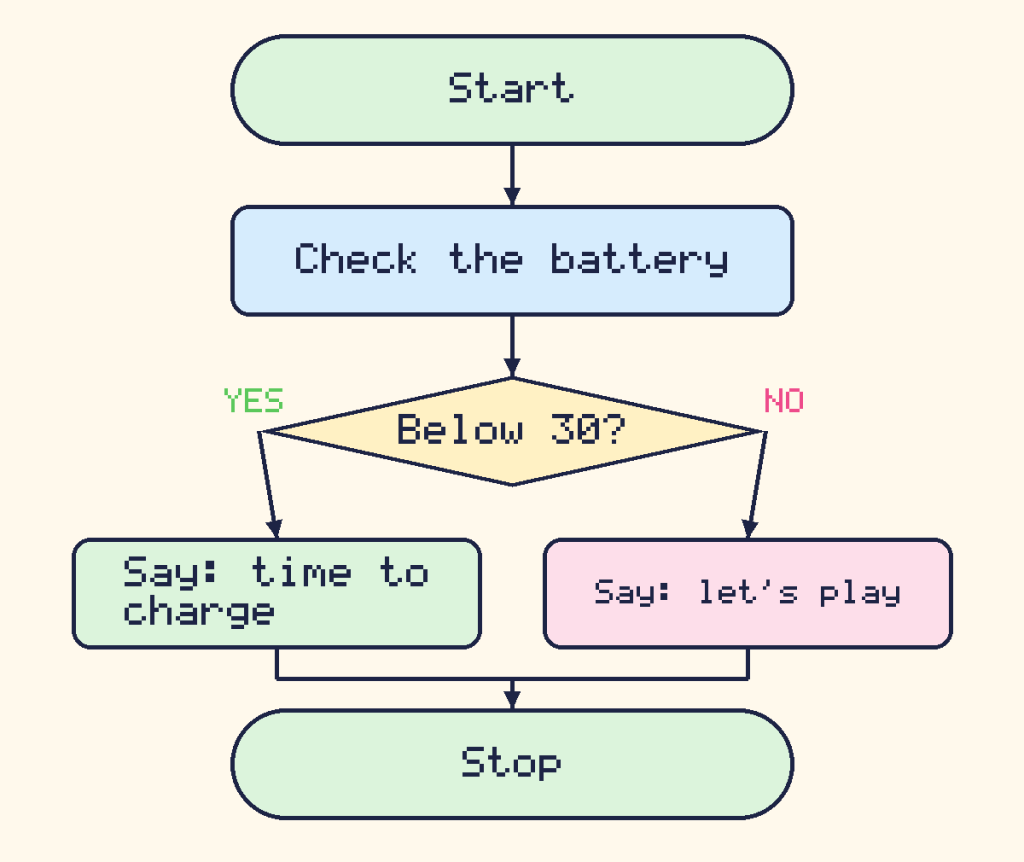
Add else to say what to do when the answer is “no”:
battery = 80
if battery < 30:
    print("Battery low. Time to charge!")
else:
    print("Plenty of power. Let's play!")
Plenty of power. Let's play!
Here is the same idea as a flowchart:
elif: more than two choices
What if there are three or more choices? Use elif, which is short for “else if”. Python checks the questions from the top and runs only the first one that is “yes”.
battery = 55
if battery > 70:
    print("I feel fantastic!")
elif battery > 30:
    print("I feel okay.")
else:
    print("I feel sleepy.")
I feel okay.
With battery = 55, the first question (battery > 70) is “no”, so Python moves on. The second (battery > 30) is “yes”, so it prints I feel okay. and skips the rest.
| Battery | What the robot says |
|---|---|
| 71 to 100 | I feel fantastic! |
| 31 to 70 | I feel okay. |
| 0 to 30 | I feel sleepy. |
Robot mood: ask the user
Now let us combine decisions with input. This program asks for a battery number and decides the robot’s mood. Do not forget int( ) from the last lesson!
battery = int(input("Battery level from 0 to 100: "))
if battery > 70:
    print("Beep boop! I feel fantastic!")
elif battery > 30:
    print("I feel okay.")
else:
    print("Yawn... I feel sleepy.")
Battery level from 0 to 100: 85 Beep boop! I feel fantastic!
Try it again with 50, then with 10. You should see the other two moods.
A tiny quiz
Strings can be compared with == too. Capital letters count, so "Cat" and "cat" are different. Adding .lower() turns the answer into small letters first, so it does not matter how the player types it:
answer = input("What is the capital city of France? ")
if answer.lower() == "paris":
    print("Correct! Well done!")
else:
    print("Not quite. It is Paris.")
What is the capital city of France? Paris Correct! Well done!
You can also use the words and and or to combine two questions into one:
coins = 5
has_ticket = True
if coins >= 3 and has_ticket:
    print("You can ride the robot train!")
else:
    print("Sorry, no ride today.")
You can ride the robot train!
With and, both parts must be “yes”. With or, only one of them has to be.
Did you know? Computers make millions of tiny decisions like these every second. Even a simple video game uses them to ask “did the player touch the coin?” and “is the game over?”
Challenges
Try it Write a program that asks for a number. If the number is bigger than 10, print “Big!”. Otherwise print “Small!”.
Show the answer
number = int(input("Pick a number: "))
if number > 10:
    print("Big!")
else:
    print("Small!")
With 14 it prints Big!. With 10 it prints Small!, because 10 is not bigger than 10.
Try it Make a quiz question of your own with input. Give a friendly message for a right answer and a different one for a wrong answer.
Try it Write a “weather robot”. Ask for the temperature (a whole number). If it is above 25, print “Wear a hat!”. If it is above 10, print “Wear a T-shirt!”. Otherwise print “Wear a coat!”.
Show the answer
temperature = int(input("What is the temperature? "))
if temperature > 25:
    print("Wear a hat!")
elif temperature > 10:
    print("Wear a T-shirt!")
else:
    print("Wear a coat!")
With 18 it prints Wear a T-shirt!.
What you learned
- An if statement runs lines only when its condition is “yes”.
elseruns when the answer is “no”, andeliflets you check more questions in order.==asks “are these equal?”, while=stores a value in a variable.- The lines inside a choice are indented.
andandorcombine conditions, and.lower()makes text comparisons easier.