
Track: Python for Kids · Lesson 10 of 10 · Ages: 8+ · Time: 40 minutes
A for loop is great when you know how many times to repeat. But sometimes you do not know. How many guesses will it take a friend to find your secret number? You cannot say in advance. You just keep going while they have not got it right. Python has a loop for exactly that.
Beep says I keep charging my battery while it is not full. I do not count the minutes. I just keep checking! Beep boop!
What you need
- Python and IDLE.
- A new file called
while_loops.py.
Grown-ups A while loop repeats as long as its condition stays true, so something inside the loop must eventually make it false. If it never does, the program runs forever. This is called an infinite loop. In IDLE, press Ctrl+C in the Shell window to stop a program that will not stop. Tell your child this before they start, so it is a funny moment rather than a worrying one.
The while loop
A while loop looks like an if statement. It checks a condition, and if it is true, it runs the indented lines. The difference is that after running them, it goes back and checks again.
count = 5
while count > 0:
    print(count)
    count = count - 1
print("Blast off!")
5 4 3 2 1 Blast off!
Let us follow it step by step:
countstarts at 5. Is 5 bigger than 0? Yes, so print 5, then changecountto 4.- Is 4 bigger than 0? Yes, so print 4, then change
countto 3. - This keeps going until
countbecomes 0. Is 0 bigger than 0? No! So the loop stops. - Python carries on with the first line after the loop, which prints “Blast off!”.
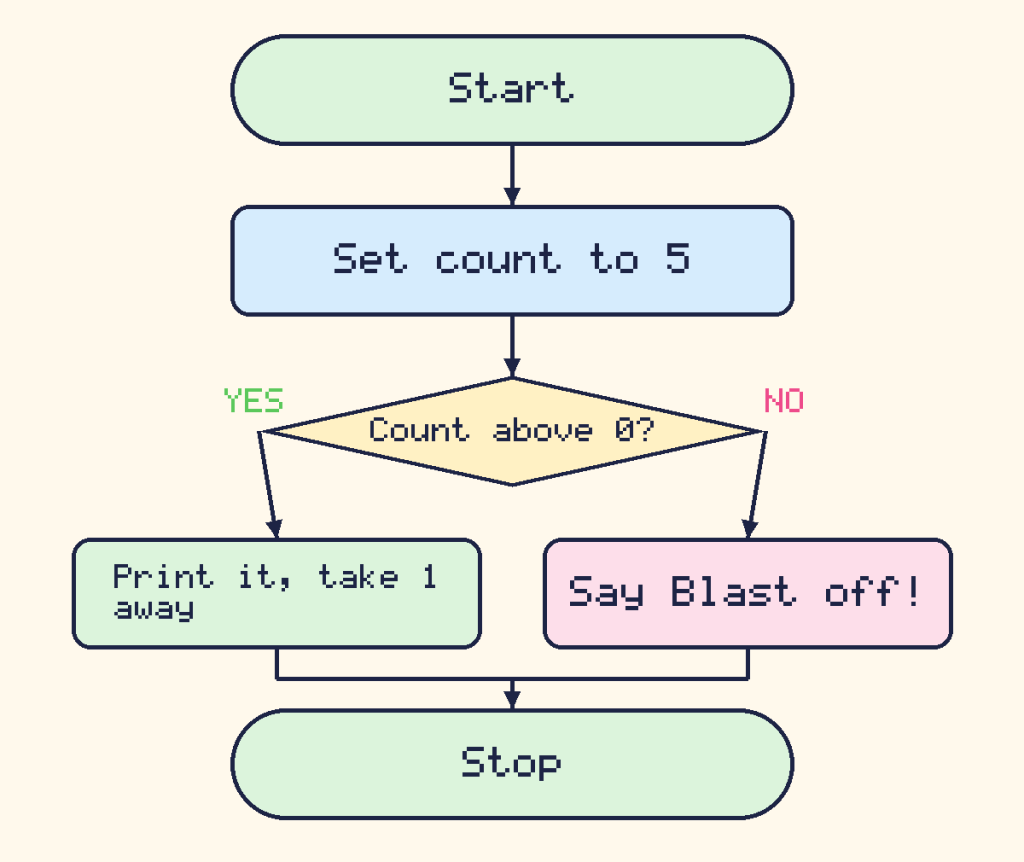
In a real program the left box loops back up to the question and checks again. The picture has the one-way arrows of a simple flowchart, so imagine that arrow going back up.
Pixel says The line count = count - 1 is the most important one. It is the line that eventually makes the condition false. Without it, the loop would never end. Meow!
Oops, the loop that never ends
Look at this broken version, but please do not run it unless a grown-up is nearby:
count = 5
while count > 0:
    print(count)
There is no line to change count, so it is always 5, and 5 is always bigger than 0. The program prints 5 forever. This is called an infinite loop. To stop one in IDLE, click in the Shell window and press Ctrl and C together. Nothing breaks, and every programmer has made one!
When to use which loop
| Loop | Use it when | Example |
|---|---|---|
for | you know how many times | draw 4 sides |
while | you repeat until something happens | guess until correct |
Waiting for the magic word
A while loop is brilliant with input, because it can keep asking until it gets what it wants. In this program, the robot keeps asking until you say the magic word. Because we cannot know how many tries you will need, a while loop is the right tool.
word = ""
while word != "please":
    word = input("Say the magic word: ")
print("That is the magic word! Door open.")
The symbol != means “is not equal to”. The loop runs while word is not "please". We started word as an empty string so that the very first check has something to look at. If you typed no, then maybe, then please, you would see:
Say the magic word: no
Say the magic word: maybe
Say the magic word: please
That is the magic word! Door open.
Guess the number
Now for a real game! The computer thinks of a secret number and you keep guessing until you get it. We will count the number of tries, too.
secret = 7
guess = 0
tries = 0
while guess != secret:
    guess = int(input("Guess my number from 1 to 10: "))
    tries = tries + 1
    if guess < secret:
        print("Too low!")
    elif guess > secret:
        print("Too high!")
print("You got it in", tries, "tries!")
If your first three guesses were 3, 9 and 7, this is what you would see:
Guess my number from 1 to 10: 3
Too low!
Guess my number from 1 to 10: 9
Too high!
Guess my number from 1 to 10: 7
You got it in 3 tries!
Why did we write guess = 0 before the loop? The loop checks guess != secret before the first guess, so guess needs a value to start with. We chose 0 because the secret is never 0.
But a secret that is always 7 is boring! Let us use what you learned in the last lesson. Here is the same game with a random secret. It brings in random at the top and swaps secret = 7 for a random pick:
import random

secret = random.randint(1, 10)
guess = 0
tries = 0
while guess != secret:
    guess = int(input("Guess my number from 1 to 10: "))
    tries = tries + 1
    if guess < secret:
        print("Too low!")
    elif guess > secret:
        print("Too high!")
print("You got it in", tries, "tries!")
Now the secret is different every time you play. A clever player uses the “Too low!” and “Too high!” hints to narrow it down, like a detective.
A shrinking spiral
While loops can draw too. This spiral starts big and gets smaller, until the lines are too short to bother with. In lesson 6 the spiral grew. This time we subtract from size instead of adding.
import turtle

t = turtle.Turtle()
t.pencolor("darkviolet")
t.pensize(3)
size = 200
while size > 5:
    t.forward(size)
    t.left(90)
    size = size - 5

turtle.done()
Challenges
Try it Make a countdown that starts at 10 and goes down by 2 each time, so it prints 10, 8, 6, 4, 2 and then “Go!”.
Show a hint
Start count at 10, loop while count > 0, and take away 2 inside the loop.
Show the answer
count = 10
while count > 0:
    print(count)
    count = count - 2
print("Go!")
10 8 6 4 2 Go!
Try it Change the guessing game so that the player only gets 3 tries. Change the loop line to while guess != secret and tries < 3:, and after the loop print “You win!” if they guessed it, or “Out of tries!” if not.
Show the answer
secret = 7
guess = 0
tries = 0
while guess != secret and tries < 3:
    guess = int(input("Guess my number from 1 to 10: "))
    tries = tries + 1
if guess == secret:
    print("You win!")
else:
    print("Out of tries!")
With the guesses 2, 4 and 5 the player runs out of tries, so it prints Out of tries!. With the guesses 2, 4 and 7, it prints You win!.
What you learned
- A
whileloop keeps repeating while its condition is true. - Something inside the loop must change, so that the condition becomes false and the loop stops.
- A loop that never stops is called an infinite loop. In IDLE, press Ctrl+C to stop it.
forloops are for counting a known number of times, andwhileloops are for repeating until something happens.- With
while,inputandrandom, you can build real games!