
Track: Robots & Electronics · Lesson 7 of 10 · Ages: 7+ · Time: 35 minutes
A robot that drives straight into the sofa is not much use. A smart robot notices things in its way and steers around them. Today you will teach a robot that skill, using one sensor and one clever rule.
Beep says Ouch! I bumped my nose on the wall again. That is why I have a distance sensor. It lets me see the wall before I hit it. Beep boop!
What you need
- A sheet of paper and a pencil.
- A ruler and a coin.
- A few small blocks, or bottle caps, to be obstacles.
- About 35 minutes.
Grown-ups This lesson is all paper, pencil and Python, with no electronics. A distance sensor is one of the most common robot sensors, and “if something is too close, turn” is the first behaviour most robot builders program. Encourage your child to predict what the robot will do before testing it.
A distance sensor on the front
A distance sensor on the front of a robot measures how far away the nearest thing is, straight ahead. As you saw in the sensors lesson, many of them work with echoes of sound, a bit like a bat.
The robot’s program is a loop: sense, think, act, again and again. It might look like this.
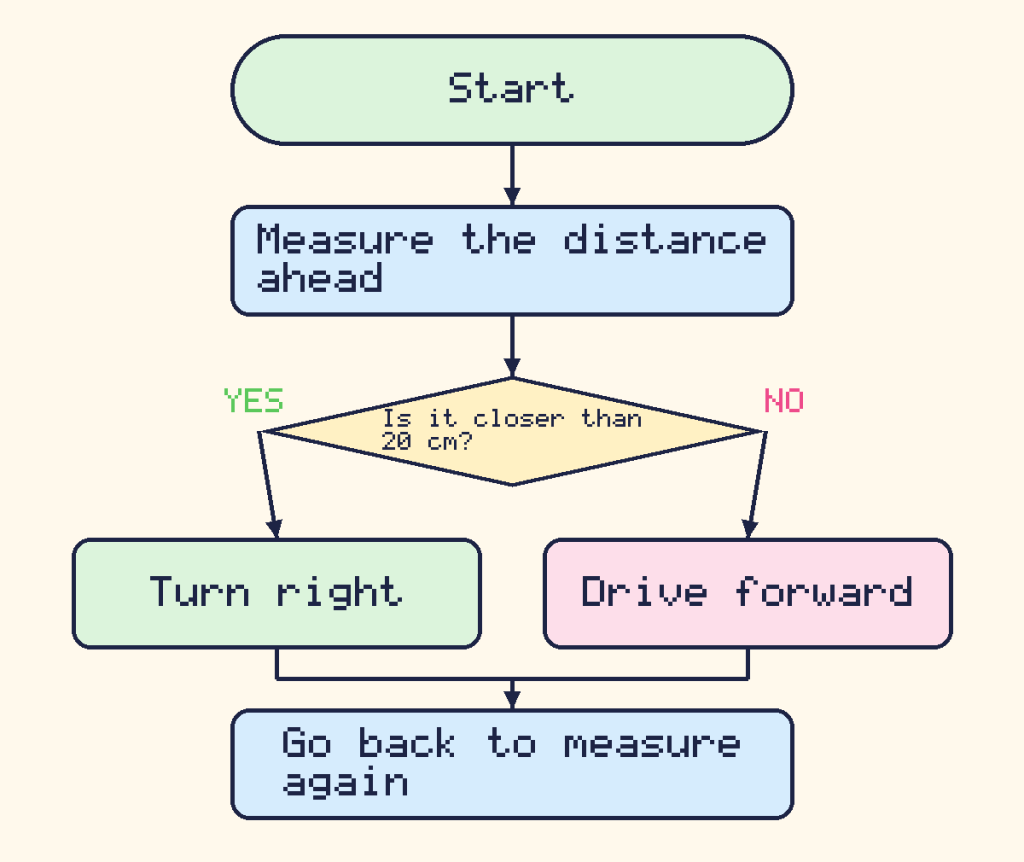
The number 20 is called a threshold. It is the line between “far enough” and “too close”. Pick a threshold that is too small, and the robot has no time to turn. Pick one that is too big, and the robot is scared of everything.
Watch the rule in Python
Our pretend robot starts 60 cm from a wall. Each time it drives forward, it gets 10 cm closer. When it turns, we pretend it finds a wide-open space 100 cm ahead.
distance_to_wall = 60
for step in range(1, 8):
    if distance_to_wall <= 20:
        print("Step", step, "- wall at", distance_to_wall, "cm. Turn right!")
        distance_to_wall = 100
    else:
        print("Step", step, "- wall at", distance_to_wall, "cm. Go forward.")
        distance_to_wall = distance_to_wall - 10
Step 1 - wall at 60 cm. Go forward. Step 2 - wall at 50 cm. Go forward. Step 3 - wall at 40 cm. Go forward. Step 4 - wall at 30 cm. Go forward. Step 5 - wall at 20 cm. Turn right! Step 6 - wall at 100 cm. Go forward. Step 7 - wall at 90 cm. Go forward.
range(1, 8) counts from 1 to 7, so the loop runs seven times. The robot turns at step 5, when the wall is 20 cm away.
Steering around a wall
Here is how Beep gets around a wall on a grid, using the same idea. The robot drives up to the wall, turns, steps past it, and then turns back towards its goal.

Read the path along the orange line. Beep goes forward twice, then turns left (L) to face up and moves one square, so it is just above the top of the wall. It turns right (R) and goes forward twice to get past the wall. Then it turns right again to face down, takes one step, turns left and takes the last step to the battery. In the next lesson you will write programs like this yourself.
Try it on paper
- Draw a room on your paper, about 20 cm by 15 cm, and put a few small blocks inside as obstacles.
- The coin is your robot. Pick a starting spot and a direction.
- Use these rules. Look ahead with your ruler. If the gap before the next block or wall is less than 3 cm, turn the coin a quarter turn to the right. Otherwise, slide it forward 2 cm.
- Take about 20 moves, and draw the robot’s path in pencil.
Did the robot reach every corner? Did it get stuck going round in a little loop? Robot builders call that getting trapped, and they fix it by adding more rules.
Pixel says If my robot keeps turning right and ends up in a corner, I could add a rule: “If I turned twice in a row, turn around and go the other way.” More rules mean smarter robots. Meow!
Did you know? Distance sensors can be fooled. A fluffy cushion soaks up sound, so a sensor that uses echoes might not notice it. A very thin chair leg might be missed too. This is why robots often carry more than one kind of sensor.
Challenges
Try it Change the rule so the robot turns when the wall is 30 cm away or less. What does Python print now?
Show the answer
Change <= 20 to <= 30. The robot now turns one step earlier, at step 4.
distance_to_wall = 60
for step in range(1, 8):
    if distance_to_wall <= 30:
        print("Step", step, "- wall at", distance_to_wall, "cm. Turn right!")
        distance_to_wall = 100
    else:
        print("Step", step, "- wall at", distance_to_wall, "cm. Go forward.")
        distance_to_wall = distance_to_wall - 10
Step 1 - wall at 60 cm. Go forward. Step 2 - wall at 50 cm. Go forward. Step 3 - wall at 40 cm. Go forward. Step 4 - wall at 30 cm. Turn right! Step 5 - wall at 100 cm. Go forward. Step 6 - wall at 90 cm. Go forward. Step 7 - wall at 80 cm. Go forward.
Try it On your paper room, make a corridor with two blocks so narrow that your coin cannot turn. What new rule would help your robot get out?
What you learned
- A distance sensor tells a robot how far away the nearest thing is.
- A threshold is the number where the robot changes its mind, such as “closer than 20 cm”.
- The rule “if something is too close, turn; otherwise go forward” lets a robot avoid obstacles.
- Robots can get trapped, so builders add more rules and more sensors.