
Track: Block Coding · Lesson 1 of 10 · Ages: 6+ · Time: 30 minutes
Have you ever built something with snap-together bricks? You click one piece onto another, and soon you have a castle, a car or a spaceship. Coding can feel just like that! In block coding, every instruction is a coloured block. You snap the blocks together, and a computer character does exactly what you built.

Beep says Hello! I am Beep, and I am a robot. I love following instructions, but I follow them exactly. If you build the blocks right, I will do something great. Beep boop!
What you need
- A pencil and some sticky notes or small scraps of paper.
- A grown-up to help you open a free block-coding app (there are lots of them, and Scratch is one well-known example). Every app looks a little different, but the big ideas in this track work in all of them.
- About half an hour.
Grown-ups Please choose a free block-based coding app, open it for your child and keep them in the driving seat. Do not enter your child’s personal details into any app, and check its privacy and sharing settings before anything is saved or shared. You can also do every step on paper first, which is a fun way to start.
Blocks, scripts and characters
Here are the words you will meet today.
- A block is one instruction, like “say hello” or “move forward”.
- A script is a stack of blocks snapped together. The computer follows it from the top to the bottom.
- A character is the thing you are programming, such as Beep or Pixel. Many apps call it a sprite.
- The stage is the screen area where your characters move around and do things.
Blocks have different shapes and colours so they only snap together where they make sense. In our pictures, yellow blocks start things, blue blocks move things, purple blocks change how a character looks or talks, and orange blocks control the order. Your app might use different colours, and that is fine.
The block that starts everything
Every script needs a way to begin. A block that starts a script is called an event block, because it waits for an event (something that happens), like you clicking a button. Event blocks have a rounded top, like a hat. Many apps use a green flag for this, but we will call it the start button. Here is a tiny script:
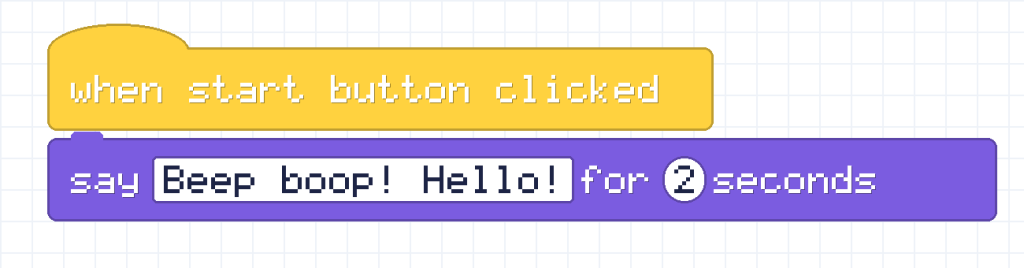
Read it from the top, like a story:
- When the start button is clicked, the script wakes up.
- Beep says “Beep boop! Hello!” and the speech bubble stays for 2 seconds.
The round white hole with a number in it is a slot. You can change the number in it. The square white hole with words in it holds text that Beep says.
Build it
- Ask your grown-up to help you open your block-coding app.
- Find the block that starts a script when the start button is clicked. Drag it into the big scripting area.
- Find the “say … for … seconds” block. Drag it under the first block until it snaps on.
- Click the start button. Does Beep say hello? You wrote your first program!
Pixel says If your character is a cat, a robot or a blob, that is fine! The blocks work the same on any character. Meow!
No computer? Use paper!
Write each block on its own sticky note. Stack the notes in order. Then ask a grown-up to be the “computer” and do exactly what the notes say, one at a time. Try the hello script above. Then swap places, and you be the computer!
Challenges
Try it Change the words in the text slot so Beep says something different. Then change the 2 to a 5. What changes when you click start?
Show the answer
The speech bubble shows your new words. With 5 in the slot, the bubble stays on screen for 5 seconds instead of 2, so it stays longer.
Try it Add a second “say” block under the first one. What does Beep do now? What happens if you swap the two say blocks?
Show a hint
Remember that a script goes from the top to the bottom. The computer does the top block first.
Show the answer
Beep says the first message, waits for its time to finish, and then says the second message. If you swap the blocks, the messages come out in the opposite order.

Did you know? Block coding is real coding! The ideas you will learn in this track, like loops and variables, are the same ideas that grown-up programmers use when they type code in languages such as Python.
What you learned
- A block is one instruction, and a script is a stack of blocks.
- An event block starts a script when something happens.
- The computer follows a script from the top to the bottom.
- You can change the slots in a block to change what it does.