
Track: Block Coding · Lesson 4 of 10 · Ages: 6+ · Time: 35 minutes
When you press a doorbell, a bell rings. When you flip a light switch, the light turns on. Something happens, and then something else happens because of it. In coding, the “something that happens” is called an event.
Beep says My favourite event is when somebody opens a new battery pack. Beep boop! Events are what make programs feel alive, because they wait for YOU.
What you need
- A block-coding app that a grown-up has helped you open.
- Beep and Pixel as two characters, or any two characters you like.
- A keyboard, if your computer has one. If you are using a tablet, you can use the click events only.
- About 35 minutes.
Grown-ups Events are the idea behind nearly every app and game your child uses. Ask them, “What event makes the screen change when you tap your favourite game?” It is a nice way to link coding to the world around them. Each of the scripts below starts with its own event block, so your child will have several stacks of blocks in the scripting area at once. That is exactly right.
Words to know
- An event is something that happens, like a key being pressed or a character being clicked.
- An event block waits for an event and then starts the script that hangs below it.
- Two scripts can run at the same time, each waiting for its own event.
Press a key
In the last lessons you started your scripts with the start button. That is one event. Here is a new one: a key press event.
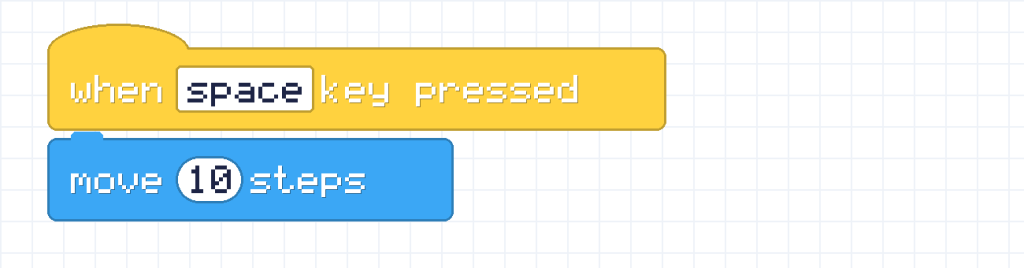
Every time you press the space key, Beep walks another 10 steps. Press it five times and Beep has walked 50 steps. The script does not run until the event happens, so nothing moves until you press the key.
Steering with arrow keys
You can have one script for each key. Each stack has its own event block at the top. In most apps, x is how far across the screen a character is, and a bigger x means further to the right.

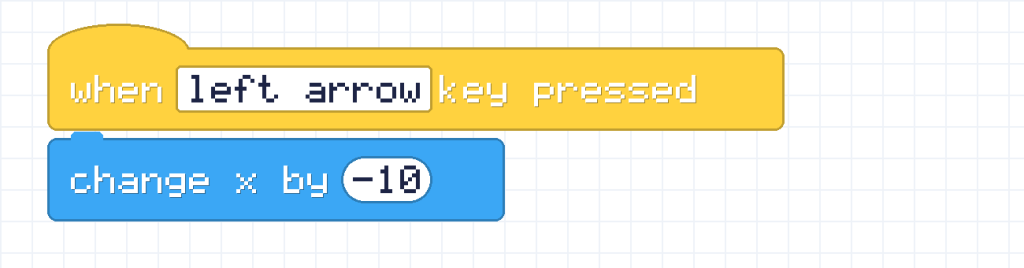
The first script moves Beep 10 to the right. The second one adds -10, which means 10 less, so Beep slides to the left. Now you can steer Beep along the bottom of the stage!
Pixel says A number with a minus sign in front is called a negative number. Adding a negative number is the same as taking away. So adding -10 moves Beep back the other way. Meow!
Click a character
Another event is clicking on a character. Let’s make Pixel hop when it is clicked. In most apps, y is how far up the screen a character is, so a bigger y means higher.

Pixel jumps up 40, waits a moment, comes back down 40, and says “Meow!”. Pixel finishes exactly where it began, because +40 and -40 cancel each other out.
Remember to build this script on Pixel, not on Beep. Each character has its own scripts, so click the character first, then drag the blocks into its scripting area.
Many scripts at once
You now have lots of scripts: some for Beep and one for Pixel. They all sit and wait. When you press the right arrow, only the right-arrow script runs. When you click Pixel, only Pixel’s script runs. If you do both at once, both can run at the same time!
Challenges
Try it Make Beep jump up and down when you press the up arrow key.
Show a hint
Pixel’s hop script is a good pattern. Change the event block at the top, and make it move Beep instead.
Show the answer

Beep goes up 40, pauses for a moment, and comes back down. You can also add say blocks to make Beep shout “Beep boop!” at the top.
Try it Beep is standing still at x = 0. You press the right arrow 3 times and the left arrow once. How far from x = 0 is Beep now, and on which side?
Show the answer
Each right press adds 10, so 3 presses give +30. One left press adds -10. Altogether 30 + (-10) = 20. Beep is 20 to the right of where it started.
Did you know? A program that waits for events like clicks and key presses is called event-driven. Your web browser, your favourite games and the apps on a tablet are all event-driven. They sit patiently until you do something.
What you learned
- An event is something that happens, like a key press or a click.
- An event block starts a script when its event happens.
- Each character has its own scripts, and many scripts can wait at the same time.
- A negative number takes away, so change x by -10 moves left.