
Track: Block Coding · Lesson 6 of 10 · Ages: 7+ · Time: 35 minutes
Think of a labelled jar on a shelf. The label says “stickers” and inside are 5 stickers. If you get 2 more, you put them in the jar, and now it holds 7. The jar is always there, the label never changes, but the number inside can go up or down.
A variable is exactly like that jar. It is a labelled box inside the computer where you keep a number or some words, and the number or words can change. Games use variables to keep score!
Beep says My batteries have a number, too: how much charge is left. That number is a variable. When I run around, the number goes down. When I recharge, it goes up. Beep boop!
What you need
- A block-coding app that a grown-up has helped you open.
- Pixel as your character.
- About 35 minutes.
Grown-ups Most block apps have a “Variables” section where you press a “Make a variable” button and type a name. Please help your child choose a simple name like score and, if asked, pick the option for all characters. Do not use a real name or other personal details as a variable name. The name score is perfect.
Words to know
- A variable is a named box that holds a value, like a number.
- The value is what is inside the box right now.
- To set a variable means to put in a brand-new value, throwing away the old one.
- To change a variable means to add to it (or take away from it).
Making a score
Make a new variable called score. Your app will give you blocks like these:
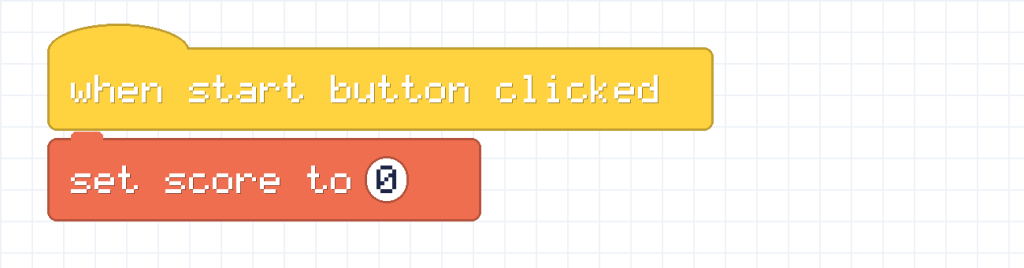
This starts every game at 0. Always set your score at the start, or an old score from last time could still be in the box!
Now Pixel needs a way to earn points. Let’s say each time you click Pixel, you get 1 point. Put this on Pixel:
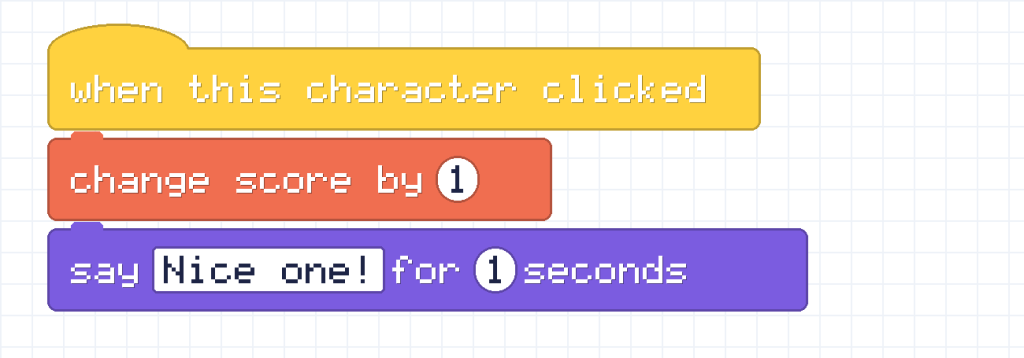
Start the game and click Pixel. Most apps show a little score display on the stage. Watch it go 0, 1, 2, 3.
Set or change?
This is the most important part of this lesson. The two blocks look alike, but they do very different things.
| Block | What it does | Example |
|---|---|---|
| set score to (5) | Throws away the old value and puts in 5 | Score is 20, then set to 5: score is 5 |
| change score by (5) | Adds 5 to whatever is there | Score is 20, then change by 5: score is 25 |
Pixel says Think of a fish bowl. Set means tip all the fish out and put in exactly 5 new ones. Change means add 5 more fish to the ones already swimming. Meow!
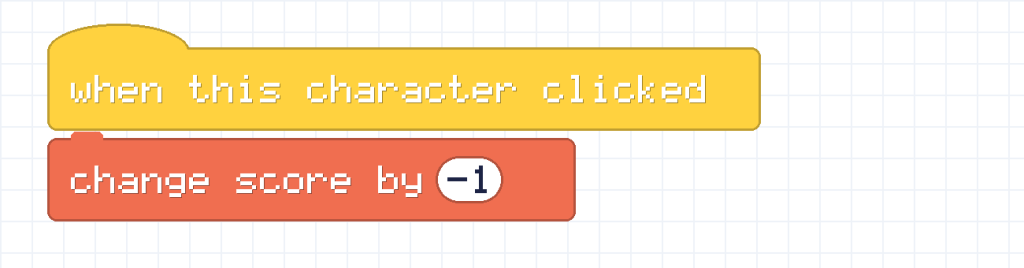
You can change by a negative number too. Change score by -1 takes a point away.
Showing a winning message
Variables become really useful when you pair them with an if block from the last lesson. This script checks the score over and over, and Pixel announces a win:

Why “greater than 4” and not “equal to 5”? Because with greater than 4, a score of 5, 6 or 7 all win. It is a safer question, because it still works if the score ever jumps up by more than 1 at a time.
Try it! Click Pixel five times. The message appears when the score reaches 5.
Same idea in Python
In a text language like Python, a variable works just the same. Here, score is the label on the box. This program changes it and prints it each time:
score = 0
print("Score:", score)
score = score + 1
print("Score:", score)
score = score + 1
print("Score:", score)
Score: 0 Score: 1 Score: 2
score = score + 1 means “take what is in the box, add 1, and put it back”. It does the same job as the change score by 1 block.
Challenges
Try it What is the score at the end? Work it out on paper first. Set score to 10, then change score by 5, then change score by 5, then set score to 3, then change score by 2.
Show the answer
Step by step: 10, then 15, then 20. Then set throws that away and puts in 3. Then change by 2 makes 5. The final score is 5.
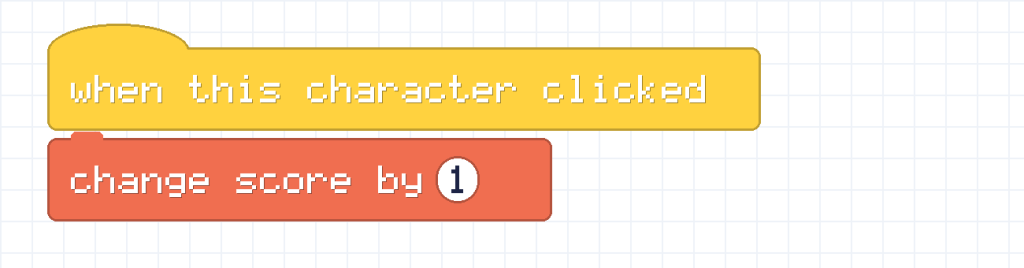
Try it Make a game where clicking Pixel adds 1 point, but clicking Beep takes away 1 point.
Show the answer
Put this script on Pixel and another on Beep:
Did you know? The word variable comes from the word vary, which means to change. A variable is something that can vary.
What you learned
- A variable is a labelled box that holds a value.
- Set puts in a brand-new value. Change adds to or takes away from the old one.
- Always set your score to 0 at the start of a game.
- Variables work with if blocks to make winning and losing.