
Track: Unplugged · Lesson 8 of 10 · Ages: 7+ · Time: 35 minutes
Even the best programmers make mistakes. A mistake in instructions or a program is called a bug. Finding and fixing bugs is called debugging, and it is one of the most important skills a coder has. Today you are a detective, and your job is to catch bugs!
Pixel says I am a great bug hunter. Fixing a bug feels even better than not having one! Meow!
What you need
- Paper and a pencil.
- A magnifying glass if you have one (optional, but very detective-y).
- A friend to swap puzzles with.
Grown-ups Debugging is about staying calm and being systematic. When a bug appears, praise the finding as much as the fixing. Try the phrase “what did you expect, and what really happened?” Those two questions lead straight to the bug. Resist fixing it for them: a child who spots a bug themselves remembers it.
The detective method
- Read the goal. What should happen?
- Run it, step by step. Follow every instruction with your finger, like a robot would.
- Find the place where it goes wrong. That is where the bug lives.
- Fix one thing.
- Test it again. Does it work now? If not, go back to step 2.
Did you know? In 1947, people working on an early computer at Harvard University found a real moth stuck inside, and taped it into their logbook. People already used the word “bug” for a machine problem before then, but the moth made the story famous!
Kinds of bugs
There are four common kinds of bugs. Learn their names and you will spot them everywhere.
| Kind of bug | What it looks like |
|---|---|
| Wrong order | Steps happen in the wrong order |
| Missing step | A needed step was left out |
| Wrong number | Something repeats too many or too few times |
| Unclear step | A step is vague, so the robot cannot do it exactly |
Case 1: the robot that crashed
Beep wants to reach the battery in the top right corner. Beep starts in the bottom left corner facing right. Here is Beep’s program, F F F F R F F F. Watch what happens!
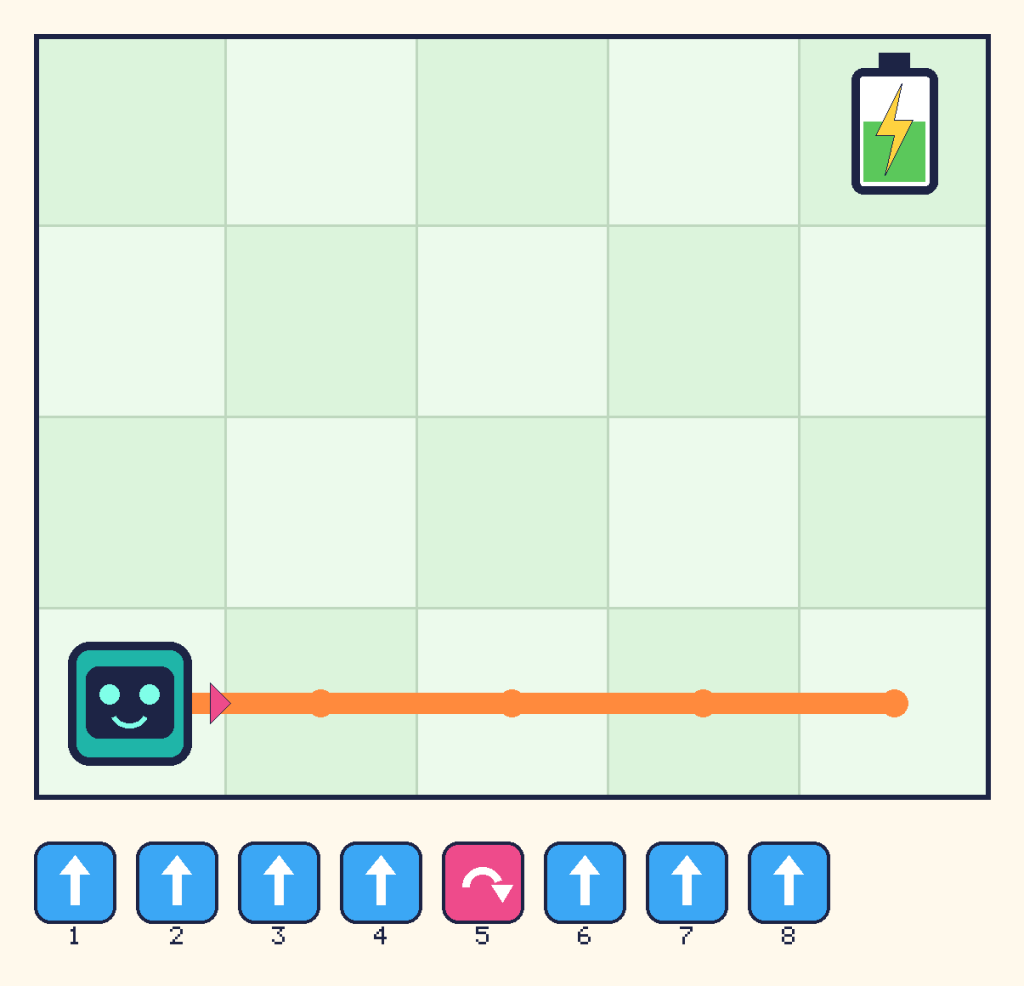
Run it with your finger. Beep walks right four squares to the corner. Then R turns Beep right, so it now faces down. The next F walks off the bottom edge. Crash! The bug is a wrong turn. The battery is up, so Beep needs to turn left.
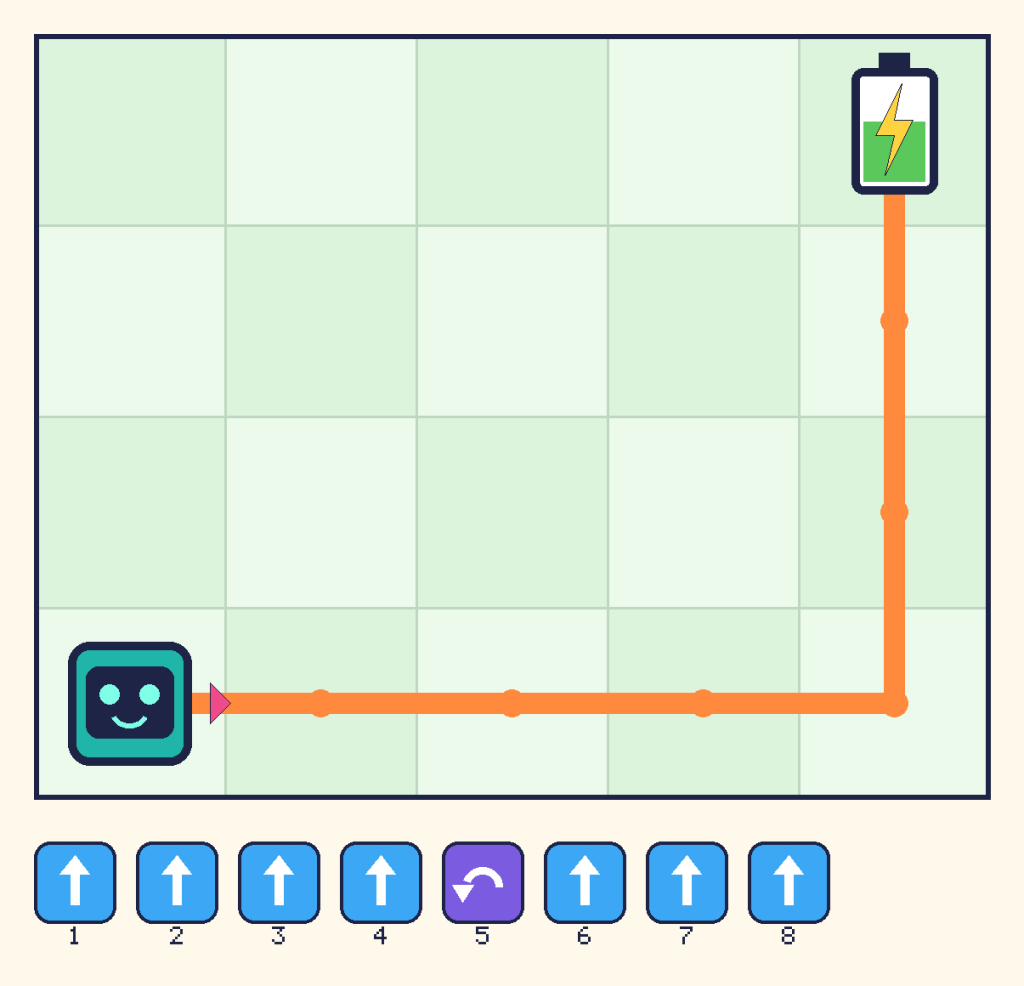
Here is the fixed program, F F F F L F F F:
Case 2: the clapping bug
The dance should be: clap, clap, stomp, three times. But this program is wrong:
repeat 3 times:
    clap
    stomp
spin
Show the answer
This is a wrong number bug. The dance needs two claps before each stomp, but there is only one in the loop. The fix is to add a second clap:
repeat 3 times:
    clap
    clap
    stomp
spin
Case 3: the bike ride
Here are some instructions for going on a bike ride. Something is out of order!
1. Ride your bike to the park.
2. Put on your helmet.
3. Pump up the tyres.
4. Wheel your bike out of the shed.
Show the answer
This is a wrong order bug. The steps should go: wheel the bike out of the shed, pump up the tyres, put on your helmet, then ride to the park.
Case 4: the unclear step
A friend writes this to draw a circle: “Draw a circle.” The robot makes a dot, because a dot is the smallest circle it can think of.
Show the answer
This is an unclear step bug. We did not say how big the circle should be or where to put it. A better step is: “Put the pencil in the middle of the page and draw a circle as wide as your hand.”
Your turn: make a bug
Write some instructions that have one bug hidden inside. Give them to a friend. Can they find it, say what kind it is, and fix it? Then swap.
Challenges
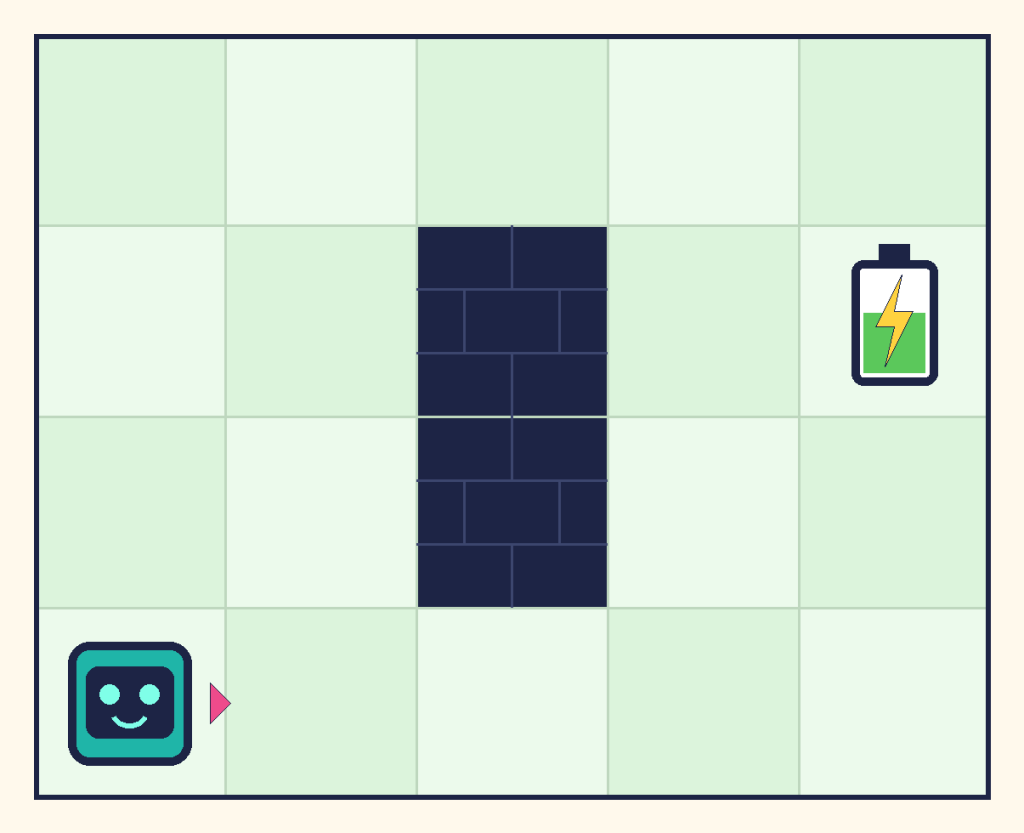
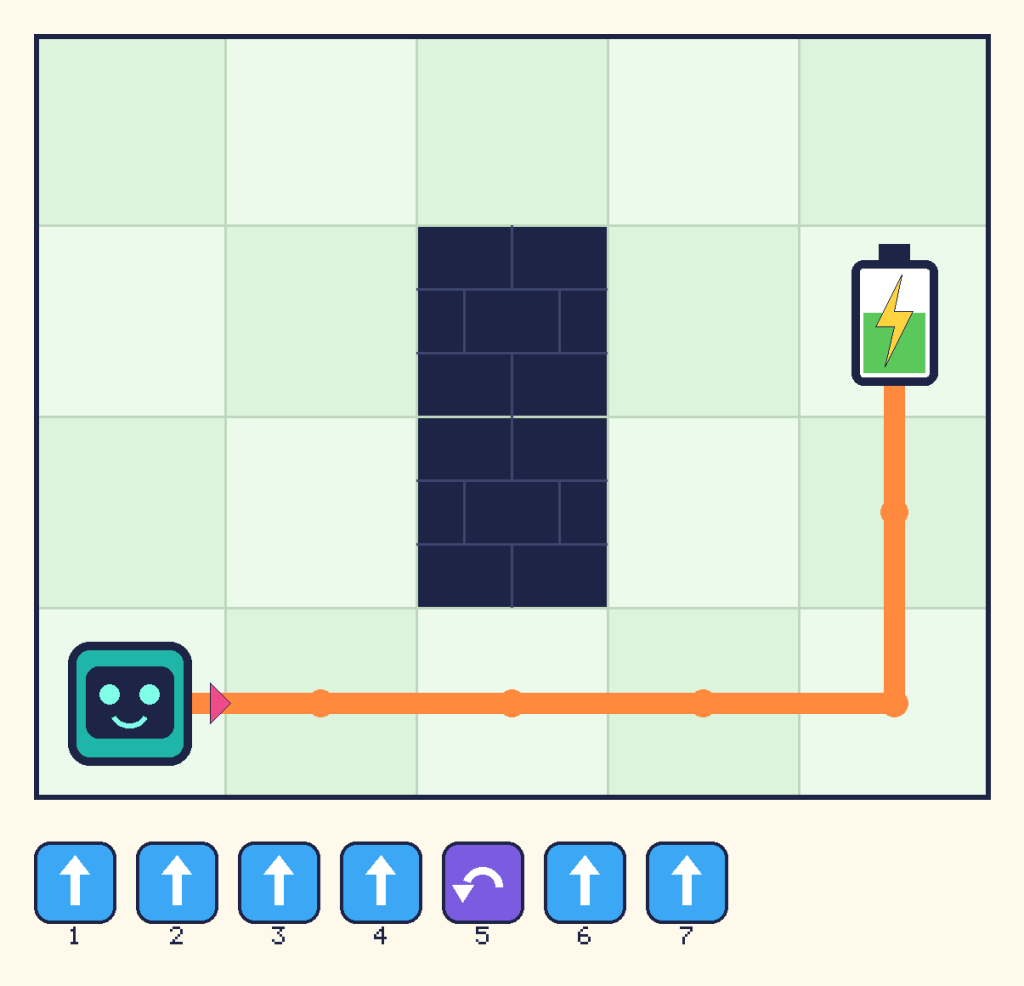
Try it Beep wants to reach the battery, but its program is F F F L F F. It does not get there. What is the bug? Here is the grid:
Show a hint
Follow the program with your finger. Where does Beep end up? Is it where the battery is?
Show the answer
Beep goes three squares right, turns left and goes up two squares. It ends up one column too far to the left, next to the battery. This is a wrong number bug. Beep needs one more F at the start. The fixed program is F F F F L F F:
What you learned
- A bug is a mistake in instructions or a program. Debugging is finding and fixing it.
- Step through a program one instruction at a time to find where it goes wrong.
- Four common bugs are wrong order, missing step, wrong number and unclear step.
- Fix one thing at a time, then test again.