
Track: Unplugged · Lesson 7 of 10 · Ages: 6+ · Time: 35 minutes
Look very closely at a computer screen, a tablet or a TV. Zoom in and you will see that the picture is made of tiny coloured squares. Each little square is called a pixel. Our cat friend Pixel is named after them, and is made of tiny squares too!
A computer cannot “see” a picture. It stores a picture as a list of numbers, one for each square. Today you will do what a computer does: turn a picture into numbers, and numbers back into a picture.
Pixel says I am made of squares. Count them if you do not believe me! Meow!
What you need
- Squared paper (or draw a grid with a ruler).
- A pencil, and a few coloured pens or pencils.
- A friend to swap pictures with.
Grown-ups This activity shows how digital images work: a grid of tiny squares, each with a colour value. Keep the pictures small, around 8 squares wide, or it becomes long and tiring. Let your child draw their own picture before turning it into numbers. Drawings of animals, shapes and patterns work well, and nothing personal is needed.
Step 1: two colours, two numbers
Let’s start with just two choices: a pink square, or an empty one. We will use the number 1 for pink and 0 for empty. Here is a heart on a grid of 8 squares wide and 7 squares tall:
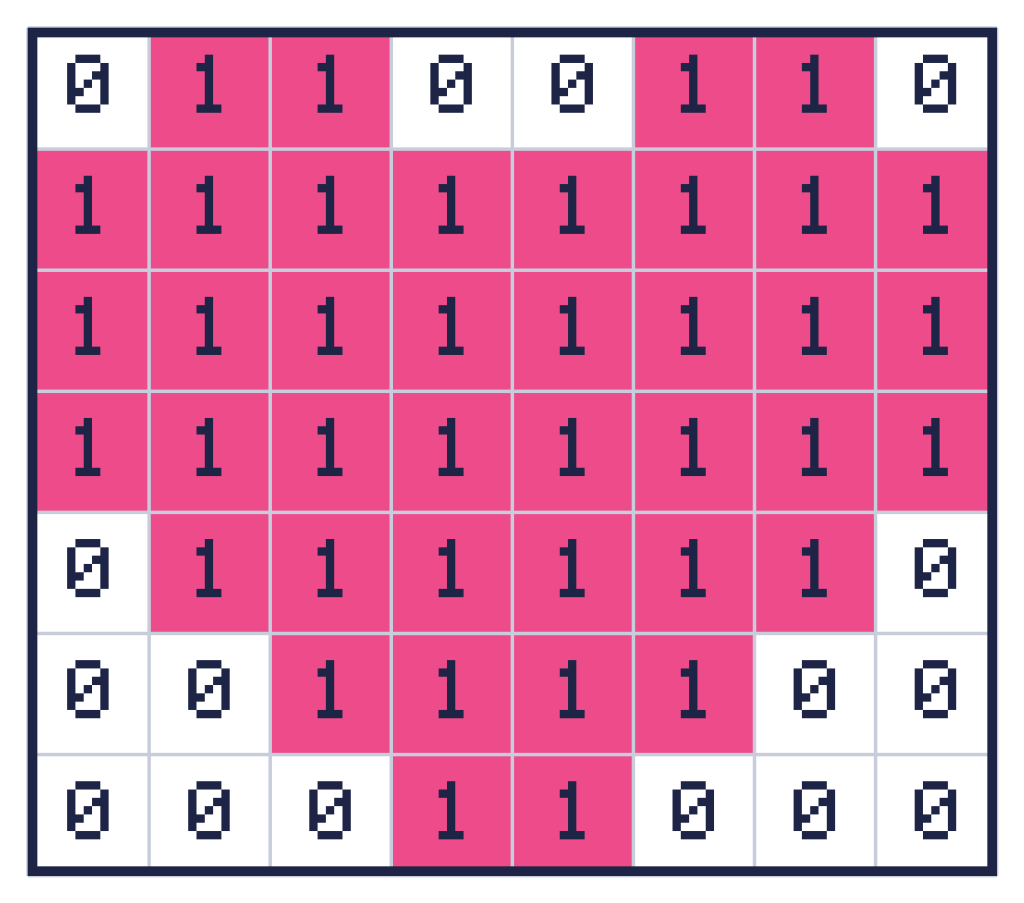
Read it row by row, from the top, from left to right. The top row is: empty, pink, pink, empty, empty, pink, pink, empty. In numbers, that is 0 1 1 0 0 1 1 0.
Here are all the rows of the heart, written as numbers:
0 1 1 0 0 1 1 0
1 1 1 1 1 1 1 1
1 1 1 1 1 1 1 1
1 1 1 1 1 1 1 1
0 1 1 1 1 1 1 0
0 0 1 1 1 1 0 0
0 0 0 1 1 0 0 0
If you gave this list of numbers to a friend who knew the rule, they could colour in the squares and get the heart back. That is exactly how a computer shows a picture!
Step 2: more colours
For more colours we just need more numbers. Here is a colour key for a fish, and then the numbers for its picture:
| Number | Colour |
|---|---|
| 0 | Leave empty (white) |
| 1 | Orange |
| 2 | Dark blue (the eye) |
| 3 | Yellow (the stripe) |
The fish is 10 squares wide and 6 squares tall. Draw a grid of that size on squared paper and colour each square to match its number:
0 0 0 1 3 1 1 0 0 0
0 0 1 1 3 1 1 1 0 1
0 1 2 1 3 1 1 1 1 1
0 1 1 1 3 1 1 1 1 1
0 0 1 1 3 1 1 1 0 1
0 0 0 1 3 1 1 0 0 0
Show the finished fish

Did your fish match? If a square looks wrong, find its number in the list and check the colour key.
Step 3: make your own
- Draw a grid on squared paper, about 8 squares wide and 8 tall.
- Colour in a simple picture, such as a smiley, a tree or a boat. Use up to three colours.
- Make a colour key, like the fish one.
- Write the number for every square, row by row.
- Give only the key and the numbers to a friend. Can they colour your picture back?
How many numbers did you need? For an 8 by 8 grid, you need 8 times 8 = 64 numbers. The fish needed 10 times 6 = 60.
Why does it matter?
A screen is just a very big grid. A common screen has 1920 squares across and 1080 down, which is 2,073,600 pixels. That is more than two million tiny squares! Each one needs its own number (or numbers) for its colour, which is why photos need a lot of computer memory.
Did you know? Computers have clever tricks for storing pictures in less space. For example, instead of writing “0 0 0 0 0 0 0 0” they might just write “8 zeros”. That kind of trick is called compression.
Challenges
Try it Row 7 of a picture is 0 0 1 1 1 1 0 0. Describe it using stretches: how many empty, then how many coloured, then how many empty?
Show the answer
2 empty, 4 coloured, 2 empty. You could write this as 2, 4, 2 instead of eight numbers, which is a tiny bit of compression!
Try it Here are three rows of a mystery picture. What shape is it?
0 0 1 1 0 0
0 1 1 1 1 0
1 1 1 1 1 1
Show a hint
Colour the 1s and leave the 0s empty. Think of a mountain or a roof.
Show the answer
It is a triangle, like a mountain or a tent! The rows get wider, 2 squares, 4 squares and then 6 squares.
What you learned
- A pixel is one tiny square of a picture.
- Computers store pictures as lists of numbers, one number per pixel.
- A colour key tells you which number means which colour.
- Using fewer numbers to describe the same picture is called compression.